本文最后更新于 2025-11-16 22:11:03
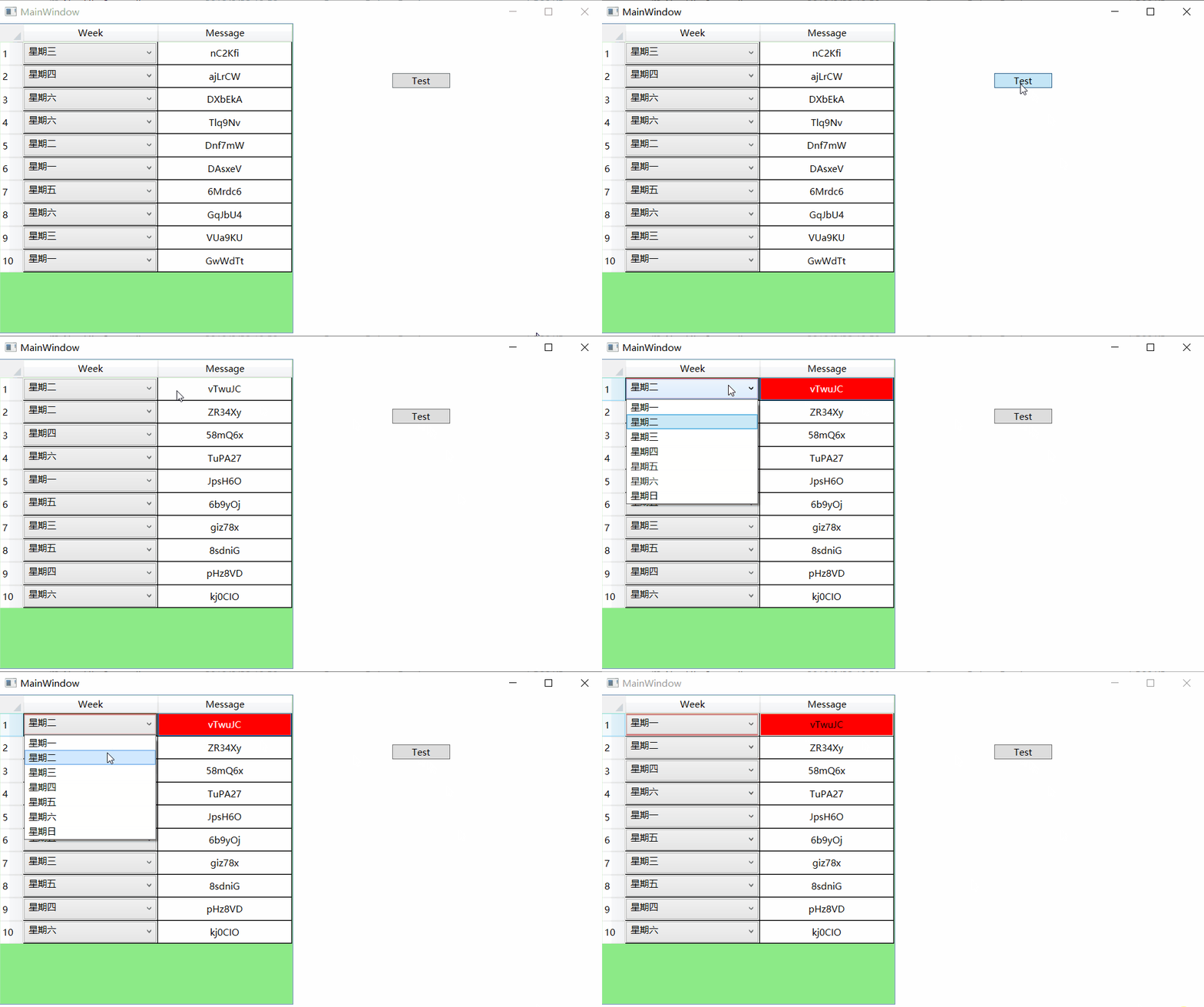
实际工作中,有时DataGrid控件某一列显示数据是从Enum集合里面选择出来的,那这时候设置列模版为ComboBox就能满足需求。而关于显示的实际内容,直接是Enum的string()返回值可能不太适合,这时候采用System.ComponentModel.Description是一个很好用的方法。
代码中定义的显示类型是Enum,实际结果在Description中声明。
定义 Enum Week 1 2 3 4 5 6 7 8 9 10 11 12 13 14 15 16 17 18 19 20 21 22 23 24 [System.ComponentModel.Description("星期" ) ]public enum WeekSystem.ComponentModel.Description("星期一" ) ]System.ComponentModel.Description("星期二" ) ]System.ComponentModel.Description("星期三" ) ]System.ComponentModel.Description("星期四" ) ]System.ComponentModel.Description("星期五" ) ]System.ComponentModel.Description("星期六" ) ]System.ComponentModel.Description("星期日" ) ]
DataGrid模版: 1 2 3 4 5 6 7 8 9 10 11 12 13 14 15 16 17 18 19 20 21 22 23 24 25 26 27 28 29 30 31 32 33 34 35 36 37 38 39 40 41 42 43 44 45 46 47 48 49 50 51 52 53 54 55 56 57 58 59 60 61 62 63 64 65 66 67 68 <Grid.Resources>
WeekEnumToDescriptionConvertor、WeekEnumToComboBoxIndexConvertor实现代码: 1 2 3 4 5 6 7 8 9 10 11 12 13 14 15 16 17 18 19 20 21 22 23 24 25 26 27 28 29 30 31 32 33 34 35 class WeekEnumToComboBoxIndexConvertor : System.Windows.Data.IValueConverter public object Convert (object value , Type targetType, object parameter, System.Globalization.CultureInfo culturereturn ((int )(Week)value );public object ConvertBack (object value , Type targetType, object parameter, System.Globalization.CultureInfo culturereturn ((Week)(int )value );class WeekEnumToDescriptionConvertor : System.Windows.Data.IValueConverter public object Convert (object value , Type targetType, object parameter, System.Globalization.CultureInfo culturevar strValue = value as string [];if (strValue != null )var enValue = new Week[strValue.Length];for (int i = 0 ; i < strValue.Length; i++)if (Enum.TryParse(strValue[i], out enValue[i]))return value ;public object ConvertBack (object value , Type targetType, object parameter, System.Globalization.CultureInfo culturethrow new NotImplementedException();
EnumHelper代码: 1 2 3 4 5 6 7 8 9 10 11 12 13 14 15 16 17 18 19 20 21 22 23 24 25 26 27 28 29 30 31 32 33 34 35 36 37 38 39 40 41 42 43 44 45 46 47 48 49 50 51 52 53 public static class EnumHelper public static string GetDescription <T >(this T value where T : struct string result = value .ToString();var fi = typeof (T).GetField(result);var attributes = (System.ComponentModel.DescriptionAttribute[])fi.GetCustomAttributes(typeof (System.ComponentModel.DescriptionAttribute), true );if (attributes != null && attributes.Length > 0 )return attributes[0 ].Description;return result;public static T GetValueByDescription <T >(this string descriptionwhere T : struct typeof (T);foreach (var field in type.GetFields())if (field.Name == description)return (T)field.GetValue(null );var attributes = (System.ComponentModel.DescriptionAttribute[])field.GetCustomAttributes(typeof (System.ComponentModel.DescriptionAttribute), true );if (attributes != null && attributes.Length > 0 )if (attributes[0 ].Description == description)return (T)field.GetValue(null );throw new ArgumentException(string .Format($"{description} 未能找到对应的枚举" ), "Description" );public static T GetValue <T >(this string value where T : struct if (Enum.TryParse(value , true , out result))return result;throw new ArgumentException(string .Format($"{value } 未能找到对应的枚举" ), "Value" );
最终效果图