树莓派系统在Docker内安装Gitlab

本文最后更新于 2025-11-21 20:54:28

原文发表在公众号

环境配置

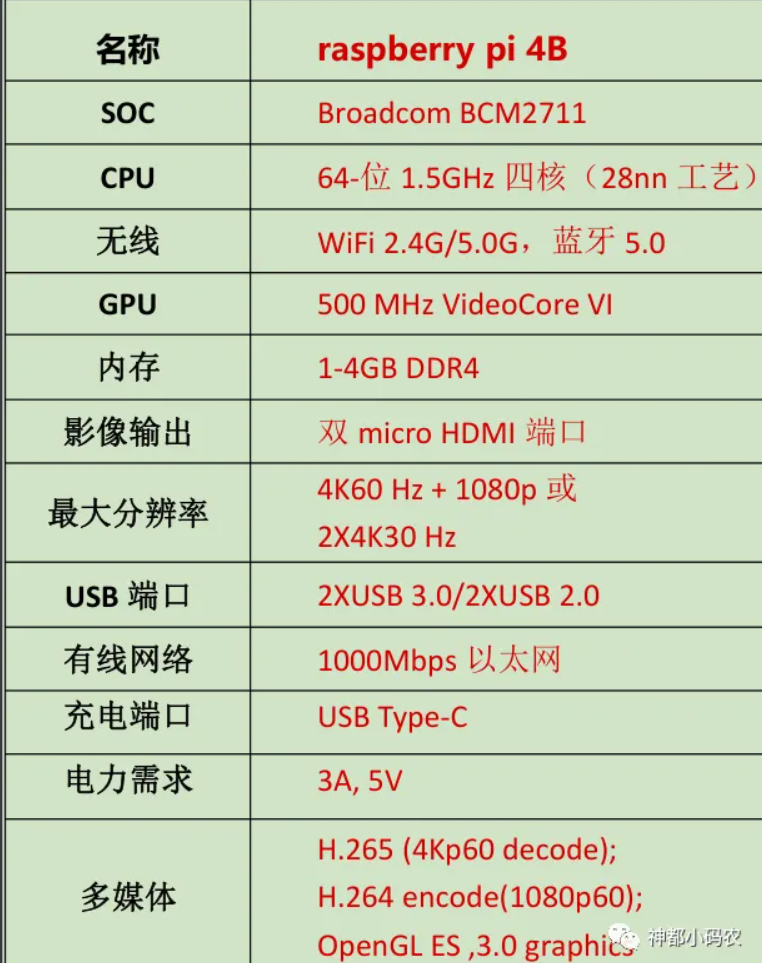
树莓派:Raspberry Pi 4B

图片

树莓派系统:
1
2
3
4
5
6
7
8
9
10
11
12
13
14
15
16
17
18
19
20
21
22
23
24
25
26
27
28
29
30
31
32
33
34
35
36
37
38
39
40
41
42
43
44
45
46
47
xxx@ubuntu:/gitlab$
xxx@ubuntu:/gitlab$ uname -a
Linux ubuntu 5.15.0-1044-raspi #47-Ubuntu SMP PREEMPT Tue Nov 21 11:33:46 UTC 2023 aarch64 aarch64 aarch64 GNU/Linux
xxx@ubuntu:/gitlab$ cat /proc/version
Linux version 5.15.0-1044-raspi (buildd@bos02-arm64-022) (gcc (Ubuntu 11.4.0-1ubuntu1~22.04) 11.4.0, GNU ld (GNU Binutils for Ubuntu) 2.38) #47-Ubuntu SMP PREEMPT Tue Nov 21 11:33:46 UTC 2023
xxx@ubuntu:/gitlab$ cat /proc/cpuinfo
processor : 0
BogoMIPS : 108.00
Features : fp asimd evtstrm crc32 cpuid
CPU implementer : 0x41
CPU architecture: 8
CPU variant : 0x0
CPU part : 0xd08
CPU revision : 3

processor : 1
BogoMIPS : 108.00
Features : fp asimd evtstrm crc32 cpuid
CPU implementer : 0x41
CPU architecture: 8
CPU variant : 0x0
CPU part : 0xd08
CPU revision : 3

processor : 2
BogoMIPS : 108.00
Features : fp asimd evtstrm crc32 cpuid
CPU implementer : 0x41
CPU architecture: 8
CPU variant : 0x0
CPU part : 0xd08
CPU revision : 3

processor : 3
BogoMIPS : 108.00
Features : fp asimd evtstrm crc32 cpuid
CPU implementer : 0x41
CPU architecture: 8
CPU variant : 0x0
CPU part : 0xd08
CPU revision : 3

Hardware : BCM2835
Revision : c03111
Serial : 100000002bc432b4
Model : Raspberry Pi 4 Model B Rev 1.1
xxx@ubuntu:/gitlab$
Docker系统
1
2
3
4
5
6
7
8
9
10
11
12
13
14
15
16
17
18
19
20
21
22
23
24
25
26
27
28
29
30
xxx@ubuntu:/gitlab$
xxx@ubuntu:/gitlab$ docker version
Client: Docker Engine - Community
Version: 24.0.5
API version: 1.43
Go version: go1.20.6
Git commit: ced0996
Built: Fri Jul 21 20:35:54 2023
OS/Arch: linux/arm64
Context: default

Server: Docker Engine - Community
Engine:
Version: 24.0.5
API version: 1.43 (minimum version 1.12)
Go version: go1.20.6
Git commit: a61e2b4
Built: Fri Jul 21 20:35:54 2023
OS/Arch: linux/arm64
Experimental: false
containerd:
Version: 1.6.22
GitCommit: 8165feabfdfe38c65b599c4993d227328c231fca
runc:
Version: 1.1.8
GitCommit: v1.1.8-0-g82f18fe
docker-init:
Version: 0.19.0
GitCommit: de40ad0
xxx@ubuntu:/gitlab$

通过docker-compose.yml安装Gitlab

1
2
3
4
5
6
7
8
9
10
11
12
13
14
15
16
17
18
19
20
21
22
23
24
25
26
27
28
29
30
31
32
33
34
35
36
37
38
39
40
41
42
43
44
45
46
47
48
49
50
51
52
53
54
55
56
57
58
59
60
61
62
63
64
65
66
67
68
69
70
71
72
73
74
75
76
77
78
79
80
81
82
83
84
85
86
87
88
89
90
91
92
93
94
95
96
97
98
99
100
101
102
103
104
105
106
107
# 强制删除目录
# sudo rm -rf xxx

# 安装docker-compose
sudo apt-get install docker-compose

# 创建Gitlab的配置(etc)、日志(logs)、数据(data)放到容器之外,便于日后升级
sudo mkdir -p /gitlab/etc
sudo mkdir -p /gitlab/logs
sudo mkdir -p /gitlab/data

# 新建自签名的证书
sudo openssl req -new -x509 -days 36500 -nodes -out /gitlab/etc/nginx.pem -keyout /gitlab/etc/nginx.key -subj "/C=US/CN=gitlab/O=gitlab.com"

# 新建并编辑文件
sudo vim /gitlab/docker-compose.yml

# 复制以下内容到文件docker-compose.yml 删除注释
gitlab:
image: yrzr/gitlab-ce-arm64v8:latest #树莓派
container_name: gitlab-ce
restart: always
hostname: 'ip'
environment:
TZ: 'Asia/Shanghai'
GITLAB_OMNIBUS_CONFIG: |
external_url "https://ip:port"
nginx['redirect_http_to_https'] = true
letsencrypt['enable'] = false
nginx['ssl_certificate'] = "/etc/gitlab/nginx.pem" # docker容器内路径
nginx['ssl_certificate_key'] = "/etc/gitlab/nginx.key"
gitlab_rails['time_zone'] = "Asia/Shanghai"
gitlab_rails['smtp_enable'] = true # 开启 SMTP 功能
gitlab_rails['smtp_address'] = "smtp.qq.com"
gitlab_rails['smtp_port'] = 465 # 端口不可以选择587,测试过会发送邮件失败
gitlab_rails['smtp_user_name'] = "xxx" # * 你的邮箱账号
gitlab_rails['smtp_password'] = "xxx" # * 授权码,不是密码
gitlab_rails['smtp_authentication'] = "login"
gitlab_rails['smtp_enable_starttls_auto'] = false
gitlab_rails['smtp_tls'] = true
gitlab_rails['gitlab_email_from'] = 'xxx@qq.com' # * 发件人信息,必须跟‘smtp_user_name’保持一致,否则报错
puma['worker_timeout'] = 600
puma['worker_processes'] = 1
sidekiq['max_concurrency'] = 4
prometheus_monitoring['enable'] = false
postgresql['shared_buffers'] = "32MB"
postgresql['max_worker_processes'] = 1
ports:
- port:port
volumes:
- /gitlab/etc:/etc/gitlab
- /gitlab/data:/var/opt/gitlab # 本地目录到docker容器目录
- /gitlab/logs:/var/log/gitlab

# 安装gitlab
sudo docker-compose up -d


# 进入容器查看初始账号密码(初始账号root)
docker exec -it gitlab-ce bash

# 进入目录/etc/gitlab
cd /etc/gitlab

# 查看文件
ls

#**** 如下所示
root@192:/etc/gitlab# ls
gitlab-secrets.json initial_root_password nginx.pem ssh_host_ecdsa_key.pub ssh_host_ed25519_key.pub ssh_host_rsa_key.pub
gitlab.rb nginx.key ssh_host_ecdsa_key ssh_host_ed25519_key ssh_host_rsa_key trusted-certs

# 打开 initial_root_password
vi initial_root_password

#**** 如下所示
# WARNING: This value is valid only in the following conditions
# 1. If provided manually (either via `GITLAB_ROOT_PASSWORD` environment variable or via `gitlab_rails['initial_root_password']` setting in `gi
# 2. Password hasn't been changed manually, either via UI or via command line.
#
# If the password shown here doesn't work, you must reset the admin password following https://docs.gitlab.com/ee/security/reset_user_password.

Password: 1/4phmfAJVGqffWddrS9KJw9wPRKoJg68LwIOvcms98=

# NOTE: This file will be automatically deleted in the first reconfigure run after 24 hours.
~
~
~
~
~
~
~
~
~
~
~
~
~
~
~
~
~
~
- initial_root_password 1/9 11%
树莓派系统在Docker内安装Gitlab
https://njit-77.github.io/2023/12/22/树莓派系统在Docker内安装Gitlab/
作者
njit-77
发布于
2023年12月22日
许可协议