本文最后更新于 2025-11-16 22:10:34
wpf 两个自定义控件
一个是IP控件,一个滑动条。先看下效果图
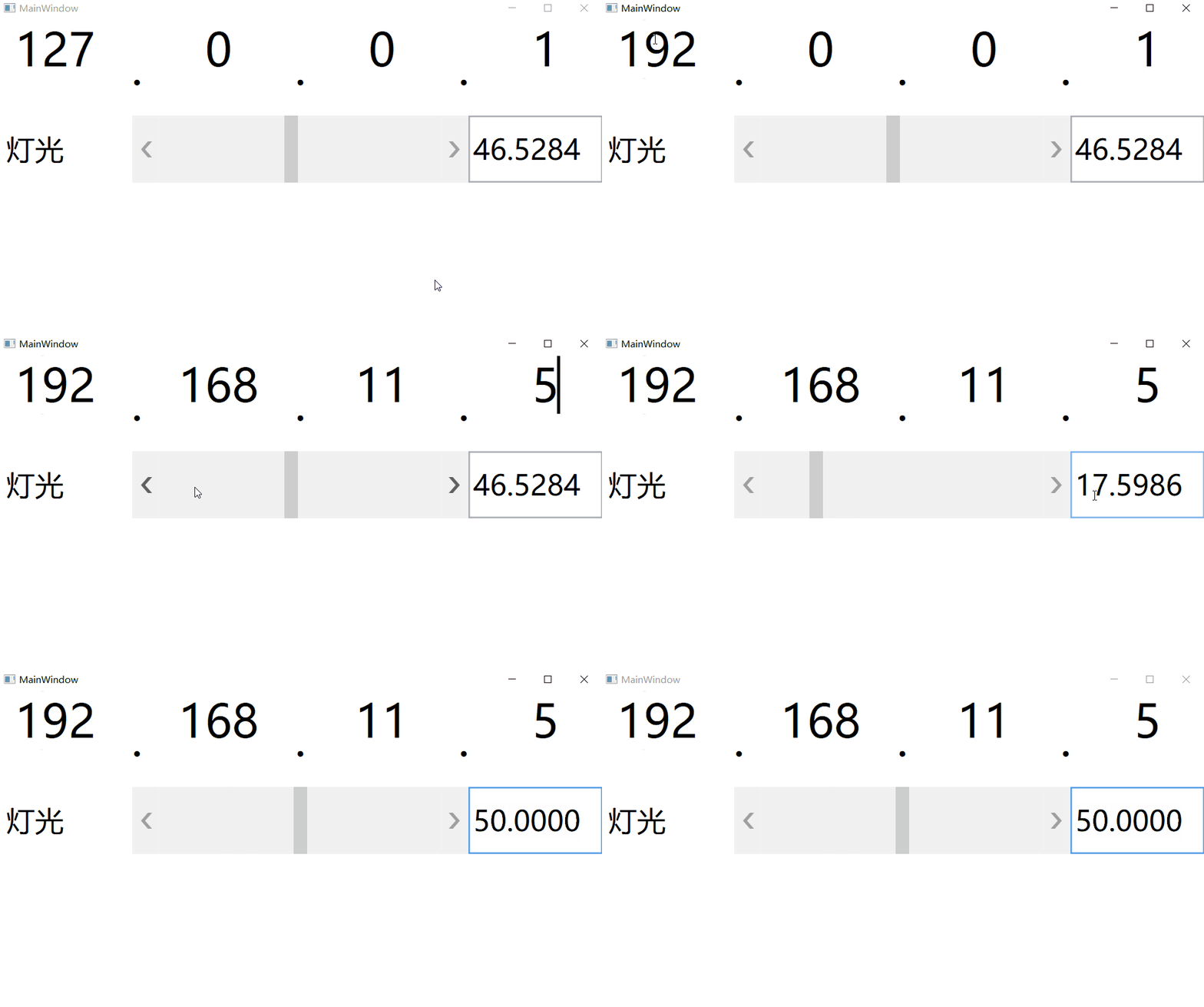
IPControl
最新版 YE.Control](https://www.nuget.org/packages/YE.Control)
1、实际工作中有时需要设置IP信息,就想着做一个ip控件。效果没有window自带的好,需要通过tab切换。但也能满足使用。废话不多说直接上代码

IPControl.xaml
1
2
3
4
5
6
7
8
9
10
11
12
13
14
15
16
17
18
19
20
21
22
23
24
25
26
27
28
29
30
31
32
33
34
35
| <UserControl x:Class="WpfApp1.IPControl"
xmlns="http://schemas.microsoft.com/winfx/2006/xaml/presentation"
xmlns:x="http://schemas.microsoft.com/winfx/2006/xaml"
xmlns:local="clr-namespace:WpfApp1">
<Viewbox>
<Border>
<DockPanel>
<DockPanel.Resources>
<Style TargetType="{x:Type TextBox}">
<Setter Property="HorizontalContentAlignment" Value="Center"/>
<Setter Property="VerticalContentAlignment" Value="Top"/>
<Setter Property="TextAlignment" Value="Center"/>
<Setter Property="BorderThickness" Value="0"/>
<Setter Property="HorizontalAlignment" Value="Left"/>
<Setter Property="VerticalAlignment" Value="Stretch"/>
<Setter Property="MaxLength" Value="3"/>
<Setter Property="Width" Value="30"/>
<Setter Property="Height" Value="25"/>
</Style>
<Style TargetType="{x:Type Label}">
<Setter Property="Content" Value="."/>
</Style>
</DockPanel.Resources>
<TextBox TabIndex="1" GotFocus="TextBoxGotFocus" Text="{Binding Path=FirstIPValue, RelativeSource={RelativeSource FindAncestor, AncestorType={x:Type local:IPControl}}, UpdateSourceTrigger=PropertyChanged}"/>
<Label/>
<TextBox TabIndex="2" GotFocus="TextBoxGotFocus" Text="{Binding Path=SecondIPValue, RelativeSource={RelativeSource FindAncestor, AncestorType={x:Type local:IPControl}}, UpdateSourceTrigger=PropertyChanged}"/>
<Label/>
<TextBox TabIndex="3" GotFocus="TextBoxGotFocus" Text="{Binding Path=ThirdIPValue, RelativeSource={RelativeSource FindAncestor, AncestorType={x:Type local:IPControl}}, UpdateSourceTrigger=PropertyChanged}"/>
<Label/>
<TextBox TabIndex="4" GotFocus="TextBoxGotFocus" Text="{Binding Path=ForthIPValue, RelativeSource={RelativeSource FindAncestor, AncestorType={x:Type local:IPControl}}, UpdateSourceTrigger=PropertyChanged}"/>
</DockPanel>
</Border>
</Viewbox>
</UserControl>
|
IPControl.xaml.cs
1
2
3
4
5
6
7
8
9
10
11
12
13
14
15
16
17
18
19
20
21
22
23
24
25
26
27
28
29
30
31
32
33
34
35
36
37
38
39
40
41
42
43
44
45
46
47
48
49
50
51
52
53
54
55
56
57
58
59
60
61
62
63
64
65
66
67
68
69
70
71
72
73
74
75
76
77
78
79
80
81
82
83
84
85
86
87
88
89
90
91
92
93
94
95
96
97
98
99
100
101
102
103
104
105
106
107
108
109
110
111
112
113
114
115
116
117
118
119
120
121
122
123
124
125
126
127
128
129
130
131
132
133
134
135
136
137
138
139
140
141
142
143
144
145
146
147
148
149
150
151
152
153
154
155
156
157
158
159
160
161
162
163
164
165
166
167
168
169
170
171
172
173
174
175
176
177
178
179
180
181
182
| public partial class IPControl : UserControl
{
public IPControl()
{
InitializeComponent();
}
#region DependencyProperty
public static readonly DependencyProperty IPAddressProperty =
DependencyProperty.Register("IPAddress", typeof(string), typeof(IPControl), new PropertyMetadata(defaultIP, (d, e) =>
{
if (d is IPControl control)
{
control.UpdateParts(control);
}
}));
public string IPAddress
{
get { return (string)GetValue(IPAddressProperty); }
set { SetValue(IPAddressProperty, value); }
}
#endregion
#region Static Field
private static readonly string defaultIP = "127.0.0.1";
#endregion
#region Field
private string firstIPValue;
private string secondIPValue;
private string thirdIPValue;
private string forthIPValue;
#endregion
#region Property
public string FirstIPValue
{
get { return firstIPValue; }
set
{
if (firstIPValue != value)
{
UpdateIPText(value, 1, ref firstIPValue);
}
}
}
public string SecondIPValue
{
get { return secondIPValue; }
set
{
if (secondIPValue != value)
{
UpdateIPText(value, 0, ref secondIPValue);
}
}
}
public string ThirdIPValue
{
get { return thirdIPValue; }
set
{
if (thirdIPValue != value)
{
UpdateIPText(value, 0, ref thirdIPValue);
}
}
}
public string ForthIPValue
{
get { return forthIPValue; }
set
{
if (forthIPValue != value)
{
UpdateIPText(value, 0, ref forthIPValue);
}
}
}
#endregion
#region Private Method
private void TextBoxGotFocus(object sender, RoutedEventArgs e)
{
InputMethod.Current.ImeState = InputMethodState.Off;
TextBox tb = sender as TextBox;
if (tb.Text.Length != 0)
{
tb.SelectAll();
}
}
private void UpdateIPText(string oldvalue, int minValue, ref string newValue)
{
int.TryParse(oldvalue, out int iValue);
if (iValue < minValue)
{
iValue = minValue;
}
if (iValue > 255)
{
iValue = 255;
}
newValue = iValue.ToString();
IPAddress = GetIPAddress();
}
private string GetIPAddress()
{
string str = "";
if (firstIPValue != null && firstIPValue.Length > 0)
{
str += firstIPValue + ".";
}
else
{
str += "0.";
}
if (secondIPValue != null && secondIPValue.Length > 0)
{
str += secondIPValue + ".";
}
else
{
str += "0.";
}
if (thirdIPValue != null && thirdIPValue.Length > 0)
{
str += thirdIPValue + ".";
}
else
{
str += "0.";
}
if (forthIPValue != null && forthIPValue.Length > 0)
{
str += forthIPValue;
}
else
{
str += "0";
}
return str;
}
private void UpdateParts(IPControl control)
{
if (control.IPAddress == null)
{
control.IPAddress = defaultIP;
}
string[] parts = control.IPAddress.Split('.');
if (parts.Length == 4)
{
control.FirstIPValue = parts[0];
control.SecondIPValue = parts[1];
control.ThirdIPValue = parts[2];
control.ForthIPValue = parts[3];
}
}
#endregion
}
|
2、控件有4个TextBox、4个Label组成。TextBox显示IP值,Label显示IP数据的“.”。
TextBox绑定依赖属性,设置TabIndex参数,通过Tab按键切换到下一个TextBox。每个TextBox最多输入3位
LightControl
1、前段时间,领导紧急安排一个工作。做一个测试灯光的小软件。与负责灯光同事沟通得知,光源板可同时控制24路灯。也就是说软件界面上需要有24个ScrollBar用来表示灯光亮度,24个Label显示名称。这要是一个一个控件加太慢了,没法做一个自定义空间,可设置显示名称,通过滑动条或者直接设置参数,改变亮度。于是需要一个Label、一个ScrollBar、一个TextBox与ScrollBar关联。

LightControl.xaml
1
2
3
4
5
6
7
8
9
10
11
12
13
14
15
16
17
18
| <UserControl x:Class="WpfApp1.LightControl"
xmlns="http://schemas.microsoft.com/winfx/2006/xaml/presentation"
xmlns:x="http://schemas.microsoft.com/winfx/2006/xaml"
xmlns:local="clr-namespace:WpfApp1">
<Viewbox>
<Border>
<DockPanel>
<Label Content="{Binding Path=LabelContent, RelativeSource={RelativeSource FindAncestor, AncestorType={x:Type local:LightControl}}}"
FontSize="17" Width="80" VerticalContentAlignment="Center"/>
<ScrollBar Value="{Binding Path=LightValue, RelativeSource={RelativeSource FindAncestor, AncestorType={x:Type local:LightControl}}}"
Orientation="Horizontal" Height="40" Width="200" Maximum="100" SmallChange="1"/>
<TextBox Text="{Binding Path=LightValue, StringFormat={}{0:F4}, RelativeSource={RelativeSource FindAncestor, AncestorType={x:Type local:LightControl}}, UpdateSourceTrigger=PropertyChanged}"
FontSize="17" Width="80" VerticalContentAlignment="Center"/>
</DockPanel>
</Border>
</Viewbox>
</UserControl>
|
LightControl.xaml.cs
1
2
3
4
5
6
7
8
9
10
11
12
13
14
15
16
17
18
19
20
21
22
23
24
25
26
27
28
29
30
31
32
33
| public partial class LightControl : UserControl
{
public LightControl()
{
InitializeComponent();
}
#region DependencyProperty
public static readonly DependencyProperty LabelContentProperty =
DependencyProperty.Register("LabelContent", typeof(string), typeof(LightControl), new PropertyMetadata("灯光"));
public string LabelContent
{
get { return (string)GetValue(LabelContentProperty); }
set { SetValue(LabelContentProperty, value); }
}
public static readonly DependencyProperty LightValueProperty =
DependencyProperty.Register("LightValue", typeof(double), typeof(LightControl), new PropertyMetadata(1.0));
public double LightValue
{
get { return (double)GetValue(LightValueProperty); }
set { SetValue(LightValueProperty, value); }
}
#endregion
}
|
2、Label显示名称通过依赖属性由外接传入。
3、ScrollBar的Value属性与TextBox的Text属性绑定同一个依赖属性,可传递到调用者,同时TextBox显示信息设置保留小数点4位。
工作中有时需要自己做一些自定义控件,用来满足不同场景的需求。两个小控件,比较简单,希望此文能提供一些思路给你。